Showing posts with label eMO. Show all posts

Friday, 15 March 2013

eMO Communication Error? Root Element is Missing

1 comments

Error "Root element is missing"
If error comes like "Root element is missing "
it means your configure.xml file corrupted
Solution:==>>
Go to other system and installed eMOClient 
open Config.xml in notepad
Copy the content of config.xml
Paste it in error system where the error is root missing is giving
file will be available at "C:\Program Files\eMOClient" 
now open config.xml of eMOclient and Give server name as your server and save it.
now run the client....it will work properly
OR
Manually you can solved 
Go to your system "C:\Program Files\eMOClient" open this in notepad and edit this file "Config.xml" give this

Tuesday, 12 March 2013

eMO Client Error??? Error no 701 Login failed for user NRega

0 comments
While running the emo client in update 5 and 6  an error or message occurs. It shows that "Cannot open database requested in login NREGAEMO. Login failed for user NREGA". While sending this error . The solution provided by CEPT mysore is given below.

Click here to download solution
Unzip the file and copy it to DBAnalyzer folder and run it from the same location. This will solve your problem.

NB. Please backup the database before running the solution

Tuesday, 1 January 2013

UPDATE 5 TO EMO CLIENT-NREG EMO CLIENT

0 comments


  Update 5 to  eMO client has been put in PTC ftp site and the link isftp://cept.gov.in/Meghdoot7/Updates/Update-5(NREG)/
    
A Readme file containing the instructions for installation is also available there.

  
Upgradation procedure for NREG in c/w eMO Client
 

·         Ensure that your emo database is already upgraded with version 7 update 3. In offices having Sanchay post latest version installed and NREGAEMO database is available, please upgrade the same with NREGAEMO script provided.
·         Stop eMO client exe if running. Replace existing eMOclient.exe available in eMO client installation path with new eMO client exe provided in upgradation.

Tuesday, 5 June 2012

BATCH FILE FOR AUTOMATIC RUNNING OF CLIENTS

0 comments

We are receiving Daily e-mail from Divisional office or Regional office Regarding epayment Client not called offices"  Here is a batch file for automatic running of Various Clients


Type the code in a text file and save the notepad as extension .bat. You can put this batch file either in Task sheduler or Start up

eg:


@ echo off
start /d "C:\Program Files\ePayment Client" ePaymentClient.exe


Tuesday, 29 May 2012

Problem in Printing eMO (Database Corrupted)

0 comments

Yesterday I got a call from one of our 
suboffices regarding the printing of e 
Money Orders. The problem is that while
 printing the eMOS an error occurs. The 
screen shot is shown. 
 The error shows

Attempt to fetch logical page in database eMO belongs to object eMO
Inward not to object eMO Offices


While checking the databases. The database is not in suspect state. While checking the Check db it shows There are some consistancy errors.. Then I tried to repair the database with query. This worked for me

Thursday, 16 February 2012

Steps for Updating Paid Date of eMO through disaster recovery option

0 comments
In Some Sub offices Postmasters found very difficult in updating the paid  date of eMO. The Easy method of updating the paid date of eMO through disaster  recovery module is shown below.


Steps for Updating Paid Date of eMO The Supervisor has to request for disaster recovery data through Transactions > Disaster
Recovery > Disaster request data Menu Option. There he has to select the pincode for which
disaster data is required and enter remarks.
 Once eMO Communication is run, disaster request will be sent to central server and the data
for disaster recovery will be received in the next or subsequent calls.
 Once the data for disaster recovery is received from central server, the Operator has to go to
DataEntry >Disaster recovery > Disaster paid entry option. There he has to select the office for
which disaster paid entry is to be done. Select PNR number and enter the paid particulars.

Saturday, 28 January 2012

eMO Communication Problem

0 comments
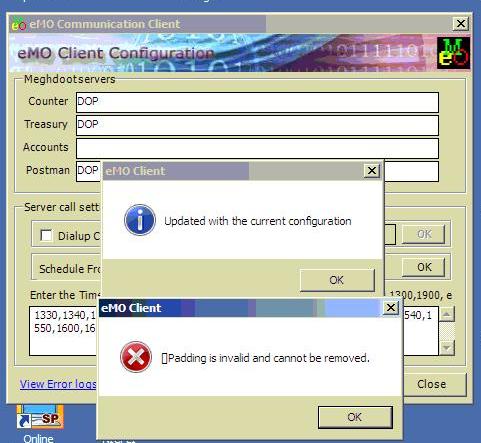
  Some times When we run eMO Communication an error occurs. It Shows the padding is invalid and cannot be removed. This error prevents eMO Communication and eMOs are pending to be received . This error occurs due to the corrupted files at RXD folder. The solution for this is shown below

lease do the following carefully.

1. stop the emo client application if running.
2. Open the data folder which is inside RXD folder in eMO client installation path.

Monday, 9 January 2012

eMO Communication Error

0 comments


Sir,
Please do the following carefully.

warning ! Please do the following carefully.


1. stop the eMO Client application if running.

Thursday, 5 January 2012

eMO Receiving Problem

0 comments
eMO Receiving Problem:

Use latest eMOClient.exe file available in PTC FTP site ...
Download the eMOClient.exe file and replace the existing eMOClient.exe file with the new one

The give Request to Central server ...

Download:ftp.ptcinfo.org/Meghdoot7/Updates/Update-1/

Friday, 16 December 2011

ERROR IN eMO FLUSH DATA

0 comments
  While flushing the emo data the following error ocuurs. Then try the exl file using script tool.


The exl file can be downloaded from the link below
Click here to Download
Related Posts Plugin for WordPress, Blogger...

Sample text


Advertisement


Copyright 2008 All Rights Reserved saparavur theme by SA PARAVURr Converted into Blogger Template by SA PARAVUR