Showing posts with label Softwares. Show all posts

Saturday, 10 March 2012

Turn off the Monitor using Keyboard

0 comments

 While using monitor off utility you can turn off the monitor by using keyboard when you step away from the computer. For example While you doing some secret things in your computer and you got a phone by this utility just by using/setting up the hot keys you can turn your monitor off. In this utility not only you can shut the monitor of but also you can lock the workstation and start screen savers.
This is a best program to protect your privacy and this is a best program to save the power bill. This program puts the monitor in stand by.

Friday, 9 March 2012

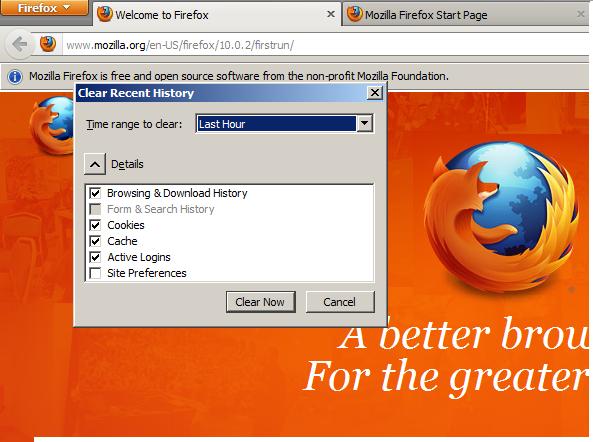
To View/Delete Browsing history in Mozilla Firefox

1 comments
 To View/Edit/Delete Browsing history in Mozilla Firefox
In Mozilla Firefox We can view the Browsing history by clicking the Ctrl+H then history bar is created/placed in left side of browser


 Or by clicking on the top side of browser on the history tab to view the browsing history Ctrl+Shift+H


 To delete the Browsing History
Just Click on Ctrl+Shift+Del Or go to Top side of the history Click on click Recent History
In that tab we can clear/delete the browsing history time ranging from last hour/last two hour/today/everything select the one and we can select the browsing/download history, cookies and click on clear now. This way we can view/Delete the browsing history in Mozilla Firefox


Thursday, 8 March 2012

PROCEDURE FOR ENTERING BOOKED AND DELIVERED INTERNATIONAL ARTILCES IN IPSWEB

0 comments

Data of booked EMS articles, International Parcels and International Registered letters
should be entered in the IPS web client following the procedure given below.
1. The web link to be used to access IPS Web Client through public internet is http://
ipsweb.ptcmysore.gov.in/ipsweb
  
Enter given username and password

Wednesday, 29 February 2012

Money Gram-Training Manual

0 comments
In an attempt to serve the customers in the international money remittance market, the Postal Department has made a tie-up with Money Gram, international money transferring company.The Training Manual of MoneyGram is published below.


Money Gram Training Manual - Click here to View


Source:sysadmindop.blogspot

Monday, 27 February 2012

How to Increase the Size of C Drive (Primary Drive) without formatting

0 comments

One day when I reached one of my offices I found a message in computer screen “low disk space”. The free space in c drive is very low. But there is enough space in other drives.
1,My First step to free up the c drive is Emptying recycle bin
Deleting the files in temp folder and using CC Cleaner But with these operations only a small space is free.
Then I found a technique in Internet to free up space in C Drive
Right-click the recycle bin.
Select Properties
Move the size slider down to about 2%
Click OK.
2,Other technique is using Gparted software.GParted is a free partition editor for graphically managing your disk partitions.With GParted you can resize, copy, and move partitions without data loss, enabling you to:

How to recover desktop icons from a blank desktop

1 comments

Today morning when I log on the computer , the Desktop screen shows as Blank . The task bar is active in the window.


How to recover your Desktop Icons?

STEP BY STEP PROCEDURE TO INSTALL NEW IMO CENTRE

1 comments

STEP BY STEP PROCEDURE TO INSTALL NEW IMO CENTRE


Saturday, 25 February 2012

Timeout Expired???- The solution

0 comments

Most of the Postmaster/sys administrators under go an error called “Timeout expired. Timeout period elapsed”. The main reason for this error is failure in network connection/Sql server is not working etc. But even if there is no failure in connection and sql server is properly working then also this error occurs. Some solutions for this problem is
Clear the log files of databases
Check network connections
Check the Firewall Status
One Simple solution (and the most worked one)is Check the ip address of the server (note the ip address). Then go to the machine which has come the error Timeout expired. Then open C Drive(The drive in which windows is installed, in my case it is C Drive)-----Go to Windows-----Open System 32-----------drivers---------------etc---------------open hosts (open with notepad)---- add an additional entry at the end ------Enter your servers ip address and server name(192.168.1.11 server)-----Then save hosts. Close all the open folders. Restart the Machine . This will solve the error Timeout expired.

All in one Driver Solution

1 comments

While formatting a machine/server many times I faced a problem is that the concerned drivers are missing . In order to fix this problem I have to search internet over hours to get correct driver software. One day while I am searching over net I found an interesting this Driver Pack solution. An all in one solution for all driver issues.
Features :-
  • Supports most of the systems including Desktops, Laptops, Printers
  • No need to worry about search around the internet for drivers
  • Automatic detection of missing drivers
  • Silent installation
  • All in one single DVD image for free.


The Site address for driverpacksolution ishttp://drp.su/
For Downloading DriverpacksolutionClick here

Saturday, 18 February 2012

Problem In Printing e Post messages in Internet Explorer

0 comments
e Post Facility will be expanded to all Computerized offices in Future. In This context there is some problem with printing of e post messages in Internet Explorer browser. While using the Internet Explorer 6,7,8,9 The e Post messages from Star Health  cannot be seen, only blank messages are being viewed while using IE 6,7,8.Till any solution is provided by NIC, all are advised to use Mozilla  Firefox for printing of e Post.While using Firefox browser you can easily view/Print the messages from Star health.

Tuesday, 14 February 2012

Western Union Money Transfer-Prerequisites for New Web based software

0 comments

Western Union has launched a new software. This was a web based software. This software requires a certificate that has been provided by WUMTs officials.
This software is worked smoothly if the default browser is Internet Explorer. Otherwise this has some problems in taking reports.
Set the Internet Explorer as Default Browser
Start-----------settings----------------Control panel
Network and Internet Settings-----------Click on Internet options
---Click Programs----------Set Internet Explorer as default browser
Two more prerequisites are required to be performed in Internet options to get a proper report of Western Union Transactions.
----Go to Internet options(Right Click on IE then go to properties)

Monday, 6 February 2012

iMO - Report Not Getting (Solution)

0 comments

 When  we  click on the print button, an error 'Unable to load print control comes'. This problem can be solved by  following solution

RUN

REGEDIT

AND DELETE THE FOLLOWING ENTRY

HKEY_LOCAL_MACHINE\SOFTWARE\Microsoft\Internet Explorer\ActiveX Compatibility\{FA91DF8D-53AB-455D-AB20-F2F023E498D3}

AND RESTART THE INTERNET EXPLORER
.

Thursday, 2 February 2012

Handling of Cheques collected for DOP DIGIFRANK from RMFS customers

0 comments


Friends  Some time we found difficulty in collecting cheques from RMFS Customers. The procedures for the acceptance of Cheque is  to be correctly done. Other wise this amount will not reflect in MIS and also no amount is credited to RMS Franking Machines. The exact procedure for collection of RMFS Payment through cheque is given below


Handling of Cheques collected for DOP DIGIFRANK from RMFS customers


All the payments/credits received from RMFS customers at the Post Offices should be handled as e-payment transactions only in Point of Sale counter under biller name DOP DIGIFRANK. The particulars are to be entered correctly.

Tuesday, 31 January 2012

Login Error in New iMO Application

1 comments
Friends,  While we login to the new imo website some of us faced a problem

While login as supervisor it shows "MAc Address Not Found Check your System settings"

This is occurred due to non proper following of instructions given in imo website.


Solution: Add the site URL : https://www.indiapostimo.gov.in/nic as trusted sites . For this go to internet options------Security-----Trusted Sites----Add all the site to trusted sites

Then click on on Custom level-----Enable all the active x controls settings

This will solve the problem

A power point presentation on this issue is available on the website https://www.indiapostimo.gov.in/nic in the tab prerequisites

The New Version of iMO Website --Contact Numbers Help Desk(Kerala Circle))

0 comments
The Circle office(Kerala ) has the following functions

1. Machine authentication(Both Supervisor and Operator)
2. Activation and deactivation of Supervisor and Operator IDs
3. Resetting of passwords (Both Supervisor and Operator)


Contact details :

iMO Helpdesk
Ph: 0471-2307993,2305718,2308081,2560723
email:imo@keralapost.gov.in

NOTE:   31/01/2012 An iMO VC is scheduled on  11.00 hrs to 14.30 hrs.iMO help-desk will not functioning during this period.

Saturday, 28 January 2012

The New Version of iMO Website is being released on 25 january 2012

0 comments
The new version of iMO Website is being released on 25 January 2012


PREREQUISTIES

1)      NIC lease line required.
2)      This new software will run on following machines :-
ü      Windows XP                                              
ü      Windows Server 2003                
ü      Windows Server 2008                
ü      Windows 7      
      3)   Dot Matrix Printer or Laser Printer required.

Thursday, 5 January 2012

TEAM VIEWER SOFTWARE

0 comments
Remote control
        Control computers remotely via the internet, as if you were sitting right in front of them. Whether you are providing spontaneous support, administering servers or working from your home office, TeamViewer lets you get the job done

Spontaneous customer support
        Do you provide daily support to your customers and need to offer quick, on-the-spot solutions? With TeamViewer, you can easily control your customer's computer remotely, as if you were sitting right in front of it. With the customer module, TeamViewer Quick Support, your customer is ready for you to connect within seconds without the need to install any software

Thursday, 22 December 2011

Computer Information Tool

0 comments
One Simple tool of All information about computers was found in http://wisesoft.co.uk/. Open to all
     

Collects WMI information about a specified computer and displays a formatted HTML report. Also allows you to monitor and terminate running processes, connect to shares on the remote computer and shutdown/reboot the remote computer. No customization required - just save the script as a HTA (*.hta) and run!


Features

  • Display information for local or remote computer.  Also, option to connect via alternative credentials.
  • Reboot/Shutdown computer.
  • Shortcuts to remote desktop and the computer management MMC console.
  • Operating System Information
  • Sortable/Searchable list of running processes
  • Ability to kill a running process (remotely)
  • Physical memory information.  See how much memory is installed and in which banks.
  • Logical disk information.  Total/Freespace information, including a graphical representation of freespace.
  • Physical disk information - information on the hard drives installed on the computer. e.g. Manufacturer, Model, Size, Serial etc.
  • Processor information - information about CPUs installed on the computer.
  • Shares - Displays a list of all the available shares.  Allows you to map shares as drives and connect to shared printers.
  • Users - Displays a list of local user accounts.
  • Reset passwords for local users and enable/disable local user accounts.
For downloading the tool Click here
Related Posts Plugin for WordPress, Blogger...

Sample text


Advertisement


Copyright 2008 All Rights Reserved saparavur theme by SA PARAVURr Converted into Blogger Template by SA PARAVUR